This page covers variables, tests and scripts, the desktop network settings and the OAuth 2.0 callback.
Variables
Define variables per environment as a JSON object and reference them anywhere with {{name}}.
Tests and scripts
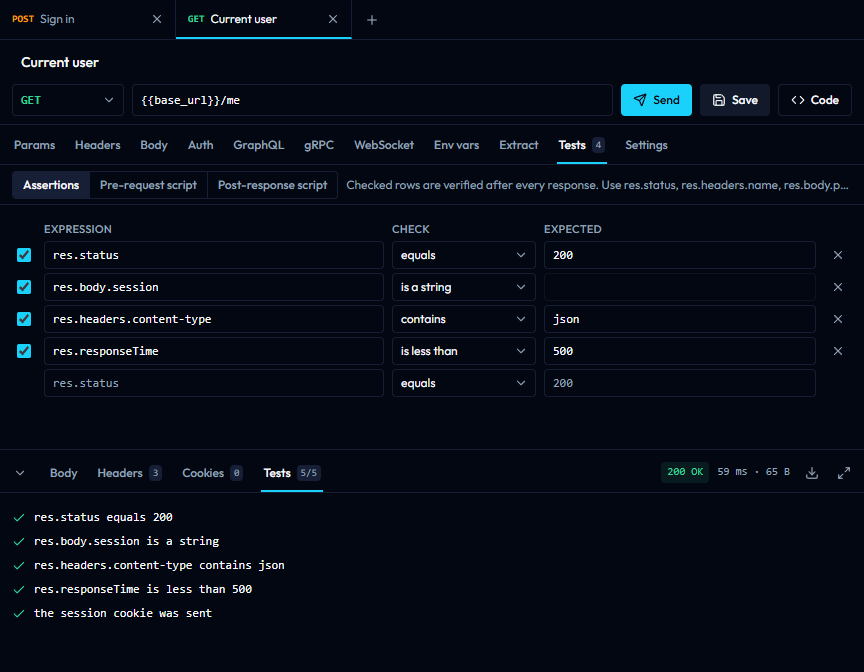
The Tests tab of a request holds assertions (res.status equals 200, res.body.user.id is a number) and pre-request and post-response scripts. Scripts are JavaScript with req, res, env.get() / env.set(), test(name, fn) and Chai's expect(). They run in an isolated worker with no network access and are stopped after 10 seconds. Results appear in the Tests tab of the response, and the runner applies the same checks to every request in a folder.
Network settings (desktop)
The gear icon in the header opens the proxy and certificate settings: use the system proxy, none, or a custom HTTP, HTTPS or SOCKS5 proxy with a bypass list; add a CA certificate; and attach client certificates to hosts. Certificates and keys are PEM files, and keys must not be passphrase-protected.
OAuth 2.0 callback
For the authorization code grant, register the callback URL shown in the Auth tab with your provider. The desktop app listens on http://localhost:9876/callback by default and the address can be changed; the web version uses /oauth-callback on its own origin.